- Oct 4
Which Money App should I use with my child? GoHenry, Rooster, Starling and HyperJar Compared - A Teacher's Perspective
- Money Savvy Kids
- 0 comments

If you have considered teaching your children about money at home, then chances are you have come across pocket money and learning apps like GoHenry, Rooster Money and the rest. Perhaps your friends' children use them. Perhaps you have started using one with your own child and are wondering whether it is worth it. If so, this is the blog post for you.
I went through the four most commonly used options properly: GoHenry, NatWest Rooster Money, Starling Under 16s and HyperJar. I have not used all of these with my own children, so what follows is a comparison of what they offer rather than a review of what they feel like to live with. I would rather be upfront about that than pretend to an experience I do not have.
What I found was four reasonable products at very different prices. What I also found, the longer I spent on it, was that the question most of us ask about them is probably the wrong one. I'll come back to that after the comparison.
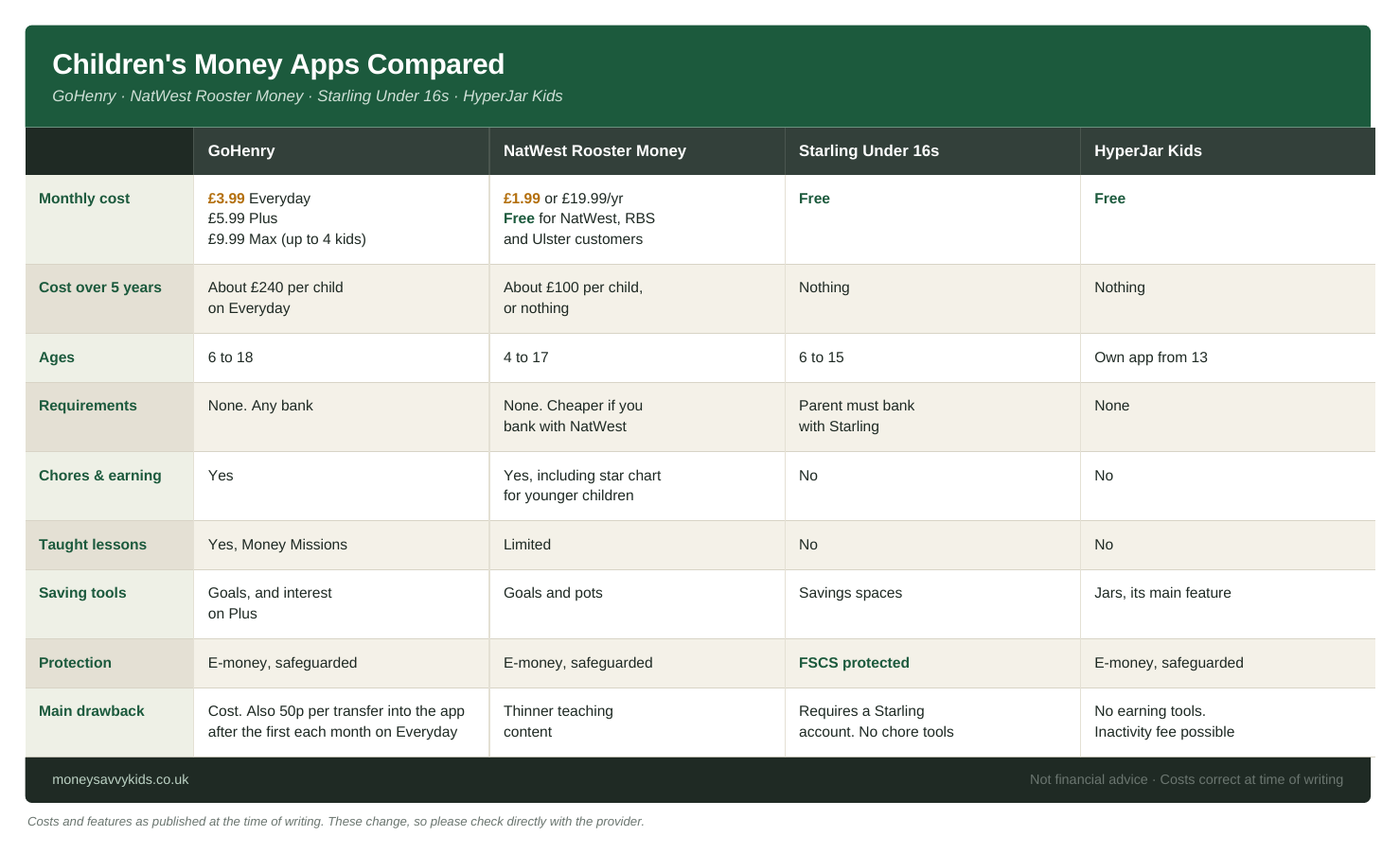
The Four Apps Compared
Everything below is as published at the time of writing. These change, so please check directly with the provider before signing up.
GoHenry
Cost: £3.99 a month per child on the Everyday tier. £5.99 on Plus. £9.99 on Max, which covers up to four children.
Ages: 6 to 18, the widest range of the four.
Requirements: None. Works alongside any bank.
What it teaches: Money Missions, which are structured lessons rather than decoration. Chore tracking, savings goals, a charity giving feature. It is also the only one of the four with a Junior ISA attached.
The catch: Cost. Around £240 over five years for one child on Everyday, and more again for two or three. There is also a 50p charge for moving money into the app after the first transfer each month on Everyday, which Plus and Max remove.
In short: The most complete of the four, and the most expensive.
NatWest Rooster Money
Cost: £1.99 a month, or £19.99 a year. Free for NatWest, RBS and Ulster Bank customers, and eligible customers can hold up to three cards without a subscription.
Ages: 4 to 17, the earliest start of the four.
Requirements: None, though it is cheaper if you already bank with NatWest.
What it teaches: Chores and pocket money tools, goals and pots, and a star chart for younger children before a card is introduced. I find that sensible. A four year old has no use for a debit card but will certainly understand stars on a chart for jobs completed.
The catch: The teaching content is thinner than GoHenry's. At £1.99 that feels fair.
In short: The best value of the four, and the one that starts youngest.
Starling Under 16s
Cost: Free. No monthly fee, no top-up fee, no charges for spending abroad.
Ages: 6 to 15.
Requirements: The parent must hold a Starling current account. This is the limiting factor.
What it teaches: Savings spaces and spending visibility. The child gets their own app and card, and you see everything from yours. There are no chore tools.
The catch: You have to bank with Starling. Worth knowing that this used to be called Starling Kite, so if you have been searching for Kite and wondering where it went, that is why.
In short: A real bank account rather than an e-money product, which means FSCS protection. Properly free.
HyperJar Kids
Cost: Free, with a small one-off charge for the physical card.
Ages: Children can have their own version of the app from 13.
Requirements: None. No bank requirement at all.
What it teaches: Jars. The whole model is dividing money into visual pots for spending, saving or a specific goal. For a child who struggles to make sense of a single balance, seeing money separated into labelled pots may be the thing that makes it concrete.
The catch: No chore or earning tools, and an inactivity fee is possible if the account sits unused.
In short: Simple and free. Good for children who think visually.
The short version
If you bank with NatWest or Starling, use theirs. They are free and genuinely good. If you bank elsewhere, Rooster Money at £1.99 does most of what GoHenry does for half the price. GoHenry is worth the extra only if the teaching content is specifically what you are paying for.
A Note on the Fees
Two of these deserve a short explanation, because they are easy to misread.
GoHenry's 50p charge is not for paying your child. Paying pocket money is free and unlimited. The 50p applies when you move money from your own bank into GoHenry, and only on the Everyday tier. You get one free transfer a month, then 50p each time after that. So if you move money across once a month and pay pocket money from it weekly, you pay nothing extra. Plus and Max remove the charge altogether.
Starling Kite is now called Starling Under 16s. Same product, new name. Worth knowing if you have been searching for Kite and wondering where it went.
The Question I Think We Should Be Asking Instead
Here is where I want to change direction, because the longer I spent comparing these, the more I felt that "which app should I get?" is not the question that gets a parent what they actually want. This is the teacher's perspective on the education being offered by these apps.
In my classroom I have found it useful to separate learning into three types: knowledge, skills and understanding. It is a distinction I keep coming back to, because it determines how something should be taught.
Knowledge is the information a child needs to know. What interest is. What a budget is. The fact that prices differ between shops.
Skills are what a child is able to do. Counting change. Dividing money into categories. Comparing two prices and working out which is better value.
Understanding is the complex combination of those two, connected to wider experience. Knowing that something is a want rather than a need while you are standing in front of it and you want it very much. Grasping that choosing one thing means not having the other. Recognising why your family might put money into savings rather than investments, and what that choice costs you.
For learning to happen we should always aim for understanding.
Apply that framework to these four apps and something becomes clear.
They are capable at knowledge. GoHenry in particular delivers information in a format children will engage with, and I would not dismiss that. Digital content can hold a child's attention in ways a conversation sometimes cannot, and for some children that is exactly the way in.
Skills are where I think the picture is more complicated than it first appears, and where I have changed my mind as I have thought about it.
On the face of it, these apps do develop skills. Setting a goal, dividing money into jars, watching a balance fall as you spend. Those are things a child is able to do, which is the definition I started with.
But a skill that only ever happens inside an app is a skill practised in a frictionless environment, and I do not think that is the same skill.
Consider the difference. Tapping a card is not the same as handing over a five pound note, waiting, and counting the change back. Dragging money into a digital jar is not the same as physically dividing coins between four jars on a kitchen table and watching one of them stay stubbornly empty. Seeing a goal fill up on a progress bar is not the same as going to the shop with the money in your pocket and discovering it is not enough.
In my classroom, skills take time to develop. They need repetition, modelling, correction in the moment, and someone noticing what is going wrong and adjusting. They often build something close to muscle memory. An app can offer the repetition. It cannot model, it cannot correct in the moment, and it certainly cannot notice.
So I would put it this way. These apps give a child the beginnings of a skill, in the easiest possible conditions. The skill becomes real when it is practised in the world, where it costs something to get it wrong and where somebody is there to help them get it right the next time.
Understanding is further still, and that is where the apps stop completely.
Why Skills and Understanding Need the Real World
Money lives in the real world. It lives in the trip to the shop where your child has £2 and the thing they want costs £3. It lives in budgeting for a day out and choosing between the ice cream and the arcade. It lives in waiting three weeks for something rather than buying the cheap version today, and finding out what that waiting actually feels like.
It lives in standing in front of something and working out whether it is a want or a need, which is a very different exercise when you want it.
It lives in a family deciding whether money for the future sits in savings or in investments, and what that means for them specifically.
It lives in opportunity cost. The thing you did not buy. The quiet reckoning afterwards about whether that was the right call.
These are human experiences. They involve feelings: disappointment, pride, regret, patience, the particular satisfaction of having waited. They almost always involve other people. A parent saying no. A sibling who chose differently. A conversation in the car on the way home.
An app can show a child a number going up. It cannot sit with them when they spend three months of savings on something that turns out to be rubbish. It cannot have the conversation afterwards. It cannot be disappointed with them, or proud of them, or ask the question that makes them think again.
I am not arguing that these apps are poor products. I think most of them are good at what they set out to do, and the free ones are good value by any measure. My concern is narrower than that. It is that a parent can reasonably pay £3.99 a month, see lessons being completed and a balance going up, and conclude that the financial education is handled.
Knowledge is being covered well. Skills are being started, which is not nothing, but they are being started in conditions that remove everything that makes them difficult. Understanding is not being touched, and no app can touch it, because understanding requires a life to happen around it.
The app, then, is a reasonable place to begin. It is not a place to finish.
What I Have Built & Use Instead
This is the thinking behind the MSK Runway.
The MSK Runway is a structured financial education programme that runs from birth to eighteen. It is not an app and it does not try to be. It is a system that a parent runs with their child, in their actual life, with the conversations and the decisions and the small moments that understanding is built from.
It runs on two tracks at once.
Track 1 is the education. Four jars: Spend, Save, Give and Invest. Earning through real jobs. Real decisions in real shops. Conversations about wants and needs. Delayed gratification experienced rather than explained. The stages are age appropriate and build on one another, from the earliest years through to the handover at eighteen.
Track 2 is the Junior ISA. Set up once and then growing quietly in the background for eighteen years. The investment side that most parents either delay or never begin at all.
Very few children arrive at adulthood with both. That is what the Runway is for.
And the Runway includes a banking app. GoHenry, Rooster, whichever suits your family. Once a child is old enough for a card, an app gives you visibility and gives them independence within sensible limits, and that is genuinely useful. I am not against them. I suggest using them as part of an educational framework.
The distinction I am drawing is about what sits around it. The app keeps score. The system is what teaches.
The complete Runway programme is £24.99 for three years. For comparison, GoHenry's entry tier over the same three years comes to around £144 for one child. I mention that not to score a point about pricing but because it reflects something I believe: the expensive part of financial education was never the software. The expensive part was that nobody had built the system for parents to follow, so as a teacher and self confessed money nerd, I've done that. As a parent I'm pricing it at a point that I hope is not a barrier to anyone who wants to get started.
Where I Have Landed
If you want a recommendation from the four, Rooster Money offers the most for the least, Starling is the obvious choice if you already bank there, and GoHenry is worth the money only if the teaching content is what you are buying.
But I do not think the choice between them is the decision that matters most. I think the decision that matters is what you build around whichever one you choose.
Next steps?
If you've got 2 minutes, Take this 10 questions quiz, "What's your child's money age?".
At the end you get your child's money age and the next 3 steps to help them understand money, no apps in sight. Made by me to help parents start building around the apps.
Thanks for reading.
Laurence
Costs and features correct at the time of writing and subject to change. Always check directly with the provider. This post reflects my own views and is for general information and educational purposes only. It is not financial advice and is not a recommendation of any specific product. Money Savvy Kids is not authorised or regulated by the Financial Conduct Authority.